Oobspark

Out Of the Box and Spark


  • 首页

  • 归档

  • 标签

基于LangChain的智能客服系统

发表于 2026-03-27

项目概述

本项目使用LangChain框架搭建了一个智能客服系统,专门用于招聘平台场景。系统集成了多种高级特性,包括大语言模型(LLM)、函数工具(Function Tool)、检索增强生成(RAG)等,为用户提供专业、准确的招聘相关信息和服务。

项目目标

  • 构建一个基于LangChain的智能客服系统
  • 集成多种高级特性,包括LLM、Function Tool、RAG等
  • 适应招聘平台场景,提供专业的招聘相关服务
  • 实现智能问答、信息检索、工具调用等功能

技术栈分析

技术/框架 版本 用途 来源
Python 3.12 编程语言 系统环境
LangChain 1.2.13 构建LLM应用的框架 pip安装
LangChain Community 0.4.1 提供社区集成的组件 pip安装
DashScope 1.25.15 调用通义千问模型 pip安装
Chroma 1.5.5 向量存储库 pip安装
HuggingFace Embeddings - 文本嵌入模型 pip安装
Sentence-Transformers 5.3.0 sentence embeddings pip安装

项目流程

系统架构

1
2
3
4
5
6
7
8
9
10
11
12
13
flowchart TD
A[用户输入] --> B[智能客服系统]
B --> C[LLM模型]
B --> D[工具调用]
B --> E[RAG检索]
D --> F[职位信息查询]
D --> G[公司信息查询]
E --> H[招聘平台手册]
F --> C
G --> C
H --> C
C --> I[生成回复]
I --> J[返回给用户]

核心流程

  1. 系统初始化
    • 加载环境变量
    • 创建示例文档(招聘平台使用指南)
    • 加载文档并分割成文本块
    • 初始化嵌入模型
    • 创建向量存储和检索器
  2. 用户交互
    • 接收用户输入
    • 调用agent处理用户请求
    • 根据需要调用工具(职位信息查询、公司信息查询、招聘平台信息检索)
    • 生成回复并返回给用户
  3. 工具调用流程
    • agent分析用户请求
    • 选择合适的工具
    • 执行工具并获取结果
    • 将结果整合到回复中
  4. RAG流程
    • 接收用户查询
    • 使用检索器从文档中检索相关信息
    • 将检索到的信息与用户查询一起发送给LLM
    • LLM基于检索到的信息生成回复

功能模块

工具函数模块

  • 职位信息查询:根据职位ID查询职位详细信息,包括职位名称、薪资范围和工作地点
  • 公司信息查询:根据公司ID查询公司详细信息,包括公司名称、规模和行业
  • 招聘平台信息检索:根据用户查询从招聘平台手册中检索相关信息

RAG模块

  • 文档处理:加载和分割招聘平台手册
  • 向量存储:使用Chroma存储文档的向量表示
  • 检索器:根据用户查询检索相关文档片段

对话管理模块

  • 用户输入处理:接收和处理用户输入
  • agent调用:使用LangChain的agent处理用户请求
  • 回复生成:基于LLM生成专业、准确的回复

演示效果

智能客服系统演示

职位信息查询

用户输入:查询职位 J001 的信息

系统回复:职位 J001: 软件工程师, 薪资: ¥20000-30000/月, 地点: 北京

公司信息查询

用户输入:查询公司 C001 的信息

系统回复:公司 C001: 科技有限公司, 规模: 500-1000人, 行业: 互联网

招聘平台信息检索

用户输入:职位发布规则是什么?

系统回复:根据招聘平台使用指南,职位发布规则包括:

  • 企业发布职位需提供真实有效的公司信息
  • 职位描述应清晰、准确,包含职责、要求和薪资范围
  • 不得发布虚假职位或违规内容

综合查询

用户输入:我想了解简历投递流程

系统回复:根据招聘平台使用指南,简历投递流程包括:

  • 求职者可通过平台直接投递简历
  • 企业应在3个工作日内查看并回复
  • 平台支持多种简历格式上传

思维导图

1
2
3
4
5
6
7
8
9
10
11
12
13
14
15
16
17
18
19
20
21
22
23
24
25
26
27
28
29
mindmap
root(智能客服系统)
技术栈
LangChain
DashScope
Chroma
HuggingFace Embeddings
功能模块
工具函数
职位信息查询
公司信息查询
RAG模块
文档处理
向量存储
检索器
对话管理
用户输入处理
agent调用
回复生成
核心流程
系统初始化
用户交互
工具调用
RAG检索
应用场景
招聘平台
职位查询
公司信息查询
招聘政策咨询

代码结构

主要文件

  • lagents.py:主脚本,包含系统的核心实现
  • recruitment_platform_manual.txt:招聘平台使用指南,用于RAG检索

核心代码结构

1
2
3
4
5
6
7
8
9
10
11
12
13
14
15
16
17
18
19
20
21
22
23
24
25
26
27
28
29
30
31
32
33
34
35
36
37
38
39
40
41
42
43
44
45
46
47
48
49
50
51
52
# 1. 导入依赖
from langchain.agents import create_agent
from langchain_community.chat_models import ChatTongyi
from langchain_community.vectorstores import Chroma
from langchain_community.embeddings import HuggingFaceEmbeddings
from langchain_text_splitters import RecursiveCharacterTextSplitter
from langchain_community.document_loaders import TextLoader
from dotenv import load_dotenv
import os

# 2. 定义工具函数
def get_job_info(job_id: str) -> str:
# 职位信息查询逻辑

def get_company_info(company_id: str) -> str:
# 公司信息查询逻辑

# 3. 准备RAG所需的文档
# 创建示例文档
# 加载文档
# 分割文档
# 初始化嵌入模型
# 创建向量存储和检索器

# 4. 定义RAG工具
def retrieve_recruitment_info(query: str) -> str:
# 检索招聘平台信息逻辑

# 5. 工具列表
tools = [get_job_info, get_company_info, retrieve_recruitment_info]

# 6. 系统提示
SYSTEM_PROMPT = """你是一个专业的招聘平台客服助手..."""

# 7. 创建agent
model = ChatTongyi(model="qwen-max")
agent = create_agent(
model=model,
tools=tools,
system_prompt=SYSTEM_PROMPT
)

# 8. 运行agent
print("智能客服系统已启动,输入'退出'结束对话")
while True:
user_input = input("用户: ")
if user_input == "退出":
break
result = agent.invoke(
{"messages": [{"role": "user", "content": user_input}]}
)
# 提取并打印客服回复

总结与展望

项目成果

  • 成功构建了一个基于LangChain的智能客服系统
  • 集成了LLM、Function Tool、RAG等高级特性
  • 适应了招聘平台场景,提供专业的招聘相关服务
  • 实现了智能问答、信息检索、工具调用等功能
  • 系统能够根据用户查询提供准确、全面的回答

未来展望

  • 功能扩展:添加更多工具函数,如面试技巧查询、薪资行情查询等
  • 性能优化:优化向量存储和检索性能,提高系统响应速度
  • 用户体验:添加对话历史记录、多轮对话支持等功能
  • 部署方案:将系统部署为Web服务,提供API接口
  • 模型优化:尝试使用不同的LLM模型,优化系统性能和准确性

技术亮点

  • 模块化设计:系统采用模块化设计,易于扩展和维护
  • 多技术集成:集成了LLM、Function Tool、RAG等多种技术
  • 实时检索:使用向量存储和检索技术,实现实时信息检索
  • 智能工具调用:agent能够根据用户需求智能选择和调用工具
  • 专业领域适配:针对招聘平台场景进行了专门的优化和适配

结论

本项目成功构建了一个基于LangChain的智能客服系统,专门用于招聘平台场景。系统集成了多种高级特性,包括LLM、Function Tool、RAG等,为用户提供专业、准确的招聘相关信息和服务。通过模块化设计和技术集成,系统具有良好的扩展性和可维护性,能够满足招聘平台的各种客服需求。

未来,我们可以通过功能扩展、性能优化、用户体验提升等方式,进一步完善系统,使其成为招聘平台的重要工具,为用户提供更加优质的服务。
并发遍历目录

发表于 2020-07-23

Talk is cheap, show you the code

为每一个 walkDir 的调用创建一个新的 goroutine。它使用 sync.WaitGroup 来为当前存活的 walkDir 调用计数,一个 goroutine 在计数器减为 0 的时候关闭 fileSizes 通道。

1
2
3
4
5
6
7
8
9
10
11
12
13
14
15
16
17
18
19
20
21
22
23
24
25
26
27
28
29
30
31
32
33
34
35
36
37
38
39
40
41
42
43
44
45
46
47
48
49
50
51
52
53
54
55
56
57
58
59
60
61
62
63
64
65
66
67
68
69
70
71
72
73
74
75
76
77
78
79
package main
import (
"flag"
"fmt"
"io/ioutil"
"os"
"path/filepath"
"sync"
"time"
)
var verbose = flag.Bool("v", false, "显示详细进度")
func main() {
// ...确定根目录...
flag.Parse()
// 确定初始目录
roots := flag.Args()
if len(roots) == 0 {
roots = []string{"."}
}
// 并行遍历每一个文件树
fileSizes := make(chan int64)
var n sync.WaitGroup
for _, root := range roots {
n.Add(1)
go walkDir(root, &n, fileSizes)
}
go func() {
n.Wait()
close(fileSizes)
}()
// 定期打印结果
var tick <-chan time.Time
if *verbose {
tick = time.Tick(500 * time.Millisecond)
}
var nfiles, nbytes int64
loop:
for {
select {
case size, ok := <-fileSizes:
if !ok {
break loop // fileSizes 关闭
}
nfiles++
nbytes += size
case <-tick:
printDiskUsage(nfiles, nbytes)
}
}
printDiskUsage(nfiles, nbytes) // 最终总数
}
func printDiskUsage(nfiles, nbytes int64) {
fmt.Printf("%d files %.1f GB\n", nfiles, float64(nbytes)/1e9)
}
func walkDir(dir string, n *sync.WaitGroup, fileSizes chan<- int64) {
defer n.Done()
for _, entry := range dirents(dir) {
if entry.IsDir() {
n.Add(1)
subdir := filepath.Join(dir, entry.Name())
go walkDir(subdir, n, fileSizes)
} else {
fileSizes <- entry.Size()
}
}
}
// sema是一个用于限制目录并发数的计数信号量
var sema = make(chan struct{}, 20)
// dirents返回directory目录中的条目
func dirents(dir string) []os.FileInfo {
sema <- struct{}{} // 获取令牌
defer func() { <-sema }() // 释放令牌
entries, err := ioutil.ReadDir(dir)
if err != nil {
fmt.Fprintf(os.Stderr, "du: %v\n", err)
return nil
}
return entries
}

Swoole精华手记

发表于 2020-07-14

知识点:

  • 可选回调
1
2
3
4
5
6
7
8
9
10
11
12
13
14
15
port 未调用 on 方法,设置回调函数的监听端口,默认使用主服务器的回调函数,port 可以通过 on 方法设置的回调有:

TCP 服务器
onConnect
onClose
onReceive
UDP 服务器
onPacket
onReceive
HTTP 服务器
onRequest
WebSocket 服务器
onMessage
onOpen
onHandshake
  • 事件执行顺序
1
2
3
4
5
6
7
8
所有事件回调均在 $server->start 后发生
服务器关闭程序终止时最后一次事件是 onShutdown
服务器启动成功后,onStart/onManagerStart/onWorkerStart 会在不同的进程内并发执行
onReceive/onConnect/onClose 在 Worker 进程中触发
Worker/Task 进程启动 / 结束时会分别调用一次 onWorkerStart/onWorkerStop
onTask 事件仅在 task 进程中发生
onFinish 事件仅在 worker 进程中发生
onStart/onManagerStart/onWorkerStart 3 个事件的执行顺序是不确定的

Spark Core

发表于 2020-04-20

基本操作

1
2
3
4
5
6
7
8
9
10
11
12
13
14
15
16
17
18
19
20
21
22
23
24
25
26
27
28
29
30
31
32
33
34
35
36
37
38
39
40
41
42
43
44
45
46
47
48
49
50
51
52
53
54
55
56
57
58
59
60
61
62
63
PYSPARK_DRIVER_PYTHON=ipython ./bin/pyspark --master local[4]


from pyspark import SparkContext, SparkConf

conf = SparkConf().setAppName('myspark').setMaster("local[4]")
sc = SparkContext(conf=conf)


PySpark 支持 Hadoop, local file system, HDFS, Cassandra, HBase, Amazon S3, etc. Spark supports text files, SequenceFiles, and any other Hadoop InputFormat.


data = [1, 2, 3, 4, 5]
# 多cpu并行计算,如sc.parallelize(data, 4)
distData = sc.parallelize(data)
distData.reduce(lambda a, b: a + b)


distFile = sc.textFile("README.md")
# 计算行数
distFile.map(lambda s: len(s)).reduce(lambda a, b: a + b)


rdd = sc.parallelize(range(1, 4)).map(lambda x: (x, "a" * x))
rdd.saveAsSequenceFile("1.txt")
sorted(sc.sequenceFile("1.txt").collect())


./bin/pyspark --jars /path/to/elasticsearch-hadoop.jar

conf = {"es.resource" : "index/type"} # assume Elasticsearch is running on localhost defaults
rdd = sc.newAPIHadoopRDD("org.elasticsearch.hadoop.mr.EsInputFormat",
"org.apache.hadoop.io.NullWritable",
"org.elasticsearch.hadoop.mr.LinkedMapWritable",
conf=conf)
rdd.first() # the result is a MapWritable that is converted to a Python dict
(u'Elasticsearch ID',
{u'field1': True,
u'field2': u'Some Text',
u'field3': 12345})


lines = sc.textFile("data.txt")
lineLengths = lines.map(lambda s: len(s))
# 等下还需要使用时,可以持久化
lineLengths.persist()
totalLength = lineLengths.reduce(lambda a, b: a + b)


# 不能使用全局变量 global,应该使用accumulator
accum = sc.accumulator(0)
sc.parallelize([1, 2, 3, 4]).foreach(lambda x: accum.add(x))
accum.value #100


rdd.collect().foreach(println) #这样打印有可能内存溢出
#打印少数元素
rdd.take(100).foreach(println)


pairs = sc.parallelize([1, 2, 3, 4]).map(lambda s: (s, 1))
counts = pairs.reduceByKey(lambda a, b: a + b)

HBASE 数据设计

发表于 2019-12-02

hbase 数据设计

读取访问模式:

  1. 用户关注谁?

  2. 特定用户A是否关注用户B?

  3. 谁关注了特定用户A?

写访问模式:

  1. 用户关注新用户。

  2. 用户取消关注某人。

Elasticsearch基本操作

发表于 2019-03-11

基本操作elasticsearch v6.8.7

1
2
3
4
5
6
创建索引
curl -X PUT "localhost:9200/customer/_doc/1?pretty" -H 'Content-Type: application/json' -d'
{
"name": "John Doe"
}
'

获取索引数据

1
curl -X GET "localhost:9200/customer/_doc/1?pretty"

批量创建索引 5MB~15MB, 1,000~5,000条记录为宜
下载accounts.json 文件,

1
2
3
4
5
{"index":{"_id":"1"}}
{"account_number":1,"balance":39225,"firstname":"Amber","lastname":"Duke","age":32,"gender":"M","address":"880 Holmes Lane","employer":"Pyrami","email":"amberduke@pyrami.com","city":"Brogan","state":"IL"}


curl -H "Content-Type: application/json" -XPOST "localhost:9200/bank/_doc/_bulk?pretty&refresh" --data-binary "@accounts.json"

查看索引索引情况
1
curl "localhost:9200/_cat/indices?v"

搜索

1
2
3
4
5
6
7
8
9
10
11
12
13
14
15
16
17
18
19
20
21
22
23
24
25
26
27
28
29
30
31
32
33
34
35
36
37
38
39
40
41
42
43
44
45
46
47
48
49
50
51
curl -X POST "localhost:9200/bank/_search?pretty" -H 'Content-Type: application/json' -d'
{
"query": { "match_all": {} },
"sort": [
{ "account_number": "asc" }
],
"from": 10,
"size": 10
}
'
curl -X GET "localhost:9200/bank/_search?pretty" -H 'Content-Type: application/json' -d'
{
"query": { "match": { "address": "mill lane" } }
}
'
curl -X GET "localhost:9200/bank/_search?pretty" -H 'Content-Type: application/json' -d'
{
"query": { "match_phrase": { "address": "mill lane" } }
}
'
curl -X GET "localhost:9200/bank/_search?pretty" -H 'Content-Type: application/json' -d'
{
"query": {
"bool": {
"must": [
{ "match": { "age": "40" } }
],
"must_not": [
{ "match": { "state": "ID" } }
]
}
}
}
'
curl -X GET "localhost:9200/bank/_search?pretty" -H 'Content-Type: application/json' -d'
{
"query": {
"bool": {
"must": { "match_all": {} },
"filter": {
"range": {
"balance": {
"gte": 20000,
"lte": 30000
}
}
}
}
}
}
'

查看索引mapping情况(索引中各字段的映射定义)

1
curl -X GET "localhost:9200/bank/_mapping?pretty"

聚合查询 Refer

记得使用state.keyword,使用完整keyword,其中size=0 表示不需要返回参与查询的文档

1
2
3
4
5
6
7
8
9
10
11
12
13
14
15
16
17
18
19
20
21
22
23
24
25
26
27
28
29
30
31
32
33
34
35
36
37
38
39
40
41
42
43
44
45
46
47
48
49
50
51
52
curl -X GET "localhost:9200/bank/_search?pretty" -H 'Content-Type: application/json' -d'
{
"size": 0,
"aggs": {
"group_by_state": {
"terms": {
"field": "state.keyword"
}
}
}
}
'
{
"size": 0,
"aggs": {
"return_expires_in": {
"sum": {
"field": "expires_in"
}
}
}
}'
{
"size": 0,
"aggs": {
"return_min_expires_in": {
"min": {
"field": "expires_in"
}
}
}
}'
{
"size": 0,
"aggs": {
"return_max_expires_in": {
"max": {
"field": "expires_in"
}
}
}
}'
{
"size": 0,
"aggs": {
"return_avg_expires_in": {
"avg": {
"field": "expires_in"
}
}
}
}'

索引自动创建
添加索引数据时,索引mapping会自己创建

1
2
3
4
5
6
7
8
9
10
11
12
13
14
15
16
17
18
19
20
PUT _cluster/settings
{
"persistent": {
"action.auto_create_index": "twitter,index10,-index1*,+ind*"
}
}

PUT _cluster/settings
{
"persistent": {
"action.auto_create_index": "false"
}
}

PUT _cluster/settings
{
"persistent": {
"action.auto_create_index": "true"
}
}

实操

es之零停机重新索引数据
生产环境的索引一定要记得创建alias,不然后面就等着哭吧!
以下所有操作都是基于一个前提:在建原始索引的时候,给原始索引创建了别名

1
2
3
4
5
6
7
8
9
10
11
12
13
14
15
16
17
18
19
20
21
22
23
24
25
26
27
28
29
30
31
PUT /my_index_v1         //创建索引 my_index_v1
PUT /my_index_v1/_alias/my_index //设置 my_index为 my_index_v1

创建mapping
1. 原始的索引bank,类型:account,mapping如下
{
"settings": {
"number_of_shards": 5
},
"mappings": {
"account": {
"properties": {
"content": {
"type" : "text",
"fields" : {
"keyword" : {
"type" : "keyword",
"ignore_above" : 256
}
}
},
"content2": {
"type" : "text"
},
"age": {
"type": "long"
}
}
}
}
}
  1. 新建一个空的索引bak_bak,类型:account,分片20,age字段由long改成了string类型,具有最新的、正确的配置
    1
    2
    3
    4
    5
    6
    7
    8
    9
    10
    11
    12
    13
    14
    15
    16
    17
    18
    19
    20
    21
    22
    23
    24
    25
    26
    {
    "settings": {
    "number_of_shards": 6
    },
    "mappings": {
    "account": {
    "properties": {
    "content": {
    "type" : "text",
    "fields" : {
    "keyword" : {
    "type" : "keyword",
    "ignore_above" : 256
    }
    }
    },
    "content2": {
    "type" : "text"
    },
    "age": {
    "type": "text"
    }
    }
    }
    }
    }
  2. 设置别名
    1
    2
    3
    4
    5
    6
    7
    8
    9
    10
    POST /_aliases
    {
    "actions": [
    { "add": { "index": "articles1", "alias": "my_index" }},
    { "add": { "index": "articles2", "alias": "my_index" }}
    ]
    }

    PUT /articles2 //创建索引 articles2
    PUT /articles2/_alias/my_index //设置 my_index为 articles2
  3. 查询当前别名下的所有索引:
    1
    GET /*/_alias/my_index
  4. 数据重新索引
    1
    2
    3
    4
    5
    6
    7
    8
    9
    POST _reindex
    {
    "source": {
    "index": "articles1"
    },
    "dest": {
    "index": "articles2"
    }
    }
    查看数据是否进入新的索引
    1
    GET articles2/article/1
  5. 接下来修改alias别名的指向(如果你之前没有用alias来改mapping,纳尼就等着哭吧)
    1
    2
    3
    4
    5
    6
    7
    8
    9
    10
    11
    12
    13
    curl -XPOST localhost:8305/_aliases -d '
    {
    "actions": [
    { "remove": {
    "alias": "my_index",
    "index": "articles1"
    }},
    { "add": {
    "alias": "my_index",
    "index": "articles2"
    }}
    ]
    }

LNMP技术栈在Docker中的使用

发表于 2019-01-20

目标

LNMP技术栈是Web开发中流行的技术栈之一,本文的目标是,利用docker搭建一套LNMP服务。

好,废话不多说,我们直入主题。

Docker的安装

Docker CE(Community Edition)社区版本本身支持多种平台的安装,如Linux,MacOS,Windows等操作系统,此外,还支持AWS,Azure等云计算平台。

如果你使用的是Windows 10,那么你可以直接Docker Desktop for Windows。要使用此工具,你需要开启你Windows中的Hyper-V服务和BIOS中的Virtualization选项。

笔者使用的是Windows 7操作系统,直接使用Docker Toolbox,下载并安装即可。

docker-toolbox

使用到的镜像

本文中会使用到以下三个基础镜像:

  • nginx:1.15
  • php:7.1-fpm
  • mysql:5.7

三个镜像都是官方提供的镜像,官方镜像保证了稳定性的同时,同时也保留了一些扩展性,使用起来比较方便。

我们先把三个镜像下载到本地备用。打开Docker Quickstart Terminal,并执行:

1
2
3
docker pull nginx:1.15
docker pull php:7.1-fpm
docker pull mariadb:10.3

常规方法

首先我们使用docker的基本命令来创建我们的容器。

  • MariaDB

打开Docker Quickstart Terminal后,执行:

1
2
3
cd lnmp
docker run --name mysql -p 3306:3306 \
-v $PWD/mysql:/var/lib/mysql -d mariadb:10.3

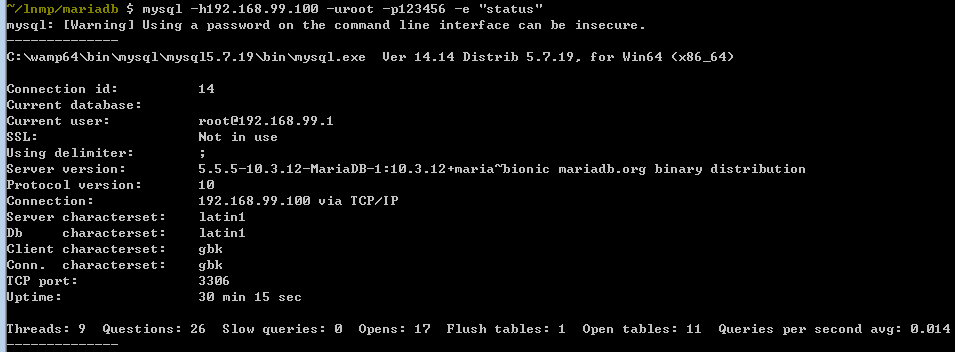
查看服务状态:

1
mysql -h192.168.99.100 -uroot -p123123 -e "status"

此处返回服务器状态信息

mariadb-status

  • PHP-FPM
1
2
docker run --name php-fpm --link mysql:mysql -p 9000:9000 \
-v $PWD/html:/var/www/html:ro -d php:7.1-fpm
--name php-fpm:
   自定义容器名

--link mysql:mysql
   与mysql容器关联,并将mysql容器的域名指定为mysql

-v $PWD/www:/var/www/html:ro
   `$PWD/www`是宿主机的php文件目录
   `/var/www/html`是容器内php文件目录
   `ro`表示只读。

官方docker中已经包含的PHP的部分基本扩展,但是很显然这并不能满足大多数的使用场景。

因此,官方还提供了docker-php-ext-configure,docker-php-ext-install和
docker-php-ext-enable等脚本供我们使用,可以更方便的安装我们的扩展。

此外,容器还提供对pecl命令的支持。

我们基于此安装我们常用一些扩展。

1
2
3
4
docker-php-ext-install pdo pdo_mysql
pecl install redis-4.0.1 && \
pecl install xdebug-2.6.0 \
docker-php-ext-enable redis xdebug

当然我们也可以选择直接编译安装。

1
2
3
4
5
6
7
8
9
10
11
12
curl -fsSL 'http://pecl.php.net/get/redis-4.2.0.tgz' \
&& tar zxvf redis-4.2.0.tgz \
&& rm redis-4.2.0.tgz \
&& ( \
cd redis-4.2.0 \
&& phpize \
&& ./configure \
&& make -j "$(nproc)" \
&& make install \
) \
&& rm -r redis-4.2.0 \
&& docker-php-ext-enable redis
  • Nginx
1
2
3
4
docker run --name nginx -p 80:80 --link php-fpm:php \
-v $PWD/default_host.conf:/etc/nginx/conf.d/default.conf:ro \
-v $PWD/html:/usr/share/nginx/html:ro \
-d nginx:1.15
--name nginx:
   自定义容器名

--link php-fpm:php
   与php-fpm容器关联,并将php-fpm容器的域名指定为php

-v $PWD/default_host.conf:/etc/nginx/conf.d/default.conf:ro
   替换host文件

-v $PWD/html:/usr/share/nginx/html:ro \
   替换网站根目录
  • 总结

至此,我们依次启动了mysql,php-fpm和nginx容器(顺序很重要,因为他们有依赖关系)。打开浏览器,访问http://192.168.99.100/,就是见证奇迹的时刻。

高阶

以上是比较常规的一种方式,也稍显麻烦。下面介绍docker-composer的配置方式。

1
2
3
4
5
6
7
8
9
10
11
12
13
14
15
16
17
18
19
20
21
22
23
24
25
26
27
28
29
30
31
32
33
34
35
36
37
38
39
40
41
42
43
version: '3'
services:
mysql:
image: mariadb:10.3
volumes:
- mysql-data:/var/lib/mysql
environment:
TZ: 'Asia/Shanghai'
MYSQL_ROOT_PASSWORD: 123123
command: ['mysqld', '--character-set-server=utf8']
ports:
- "3306:3306"
networks:
- backend
php:
image: "mylnmp/php:v1.0"
build:
context: .
dockerfile: Dockerfile-php
ports:
- "9000:9000"
networks:
- frontend
- backend
depends_on:
- mysql
nginx:
image: "mylnmp/nginx:v1.0"
build:
context: .
dockerfile: Dockerfile-nginx
ports:
- "80:80"
networks:
- frontend
depends_on:
- php
volumes:
mysql-data:

networks:
frontend:
backend:

具体可参考我的GitHub项目lnmp-container

numpy基础

发表于 2018-08-01

Numpy 简介

NumPy是一个Python包。它代表“Numeric Python”。它是一个由多维数组对象和用于处理数组的例程集合组成的库。

Numeric,即 NumPy 的前身,是由 Jim Hugunin 开发的。也开发了另一个包Numarray,它拥有一些额外的功能。2005年,Travis Oliphant通过将 Numarray的功能集成到Numeric包中来创建NumPy包。目前这个开源项目已经有非常多的贡献者。

环境搭建

在安装了python和pip之后,一个命令搞定。

pip install numpy

然后我们进入Python交互式shell。

1
2
3
import numpy as np 
a = np.array([1,2,3])
print a

如果你能正确执行上述代码,那么你的numpy环境就已经搭建好了。

基本属性

ndarray.ndim:数组维度
ndarray.shape:数组行和列的长度
ndarray.size:同shape
ndarray.dtype:数组中元素的类型
ndarray.itemsize:数组中单个元素所占字节数

1
2
3
4
5
6
7
8
9
10
11
12
13
14
15
16
17
18
19
20
21
22
23
>>> import numpy as np
>>> a = np.arange(15).reshape(3, 5)
>>> a
array([[ 0, 1, 2, 3, 4],
[ 5, 6, 7, 8, 9],
[10, 11, 12, 13, 14]])
>>> a.shape
(3, 5)
>>> a.ndim
2
>>> a.dtype.name
'int64'
>>> a.itemsize
8
>>> a.size
15
>>> type(a)
<type 'numpy.ndarray'>
>>> b = np.array([6, 7, 8])
>>> b
array([6, 7, 8])
>>> type(b)
<type 'numpy.ndarray'>

创建数组

创建数组的方式有很多,我们直接看代码。

1
2
3
4
5
6
7
8
9
10
11
12
13
14
15
16
17
18
19
20
21
22
23
24
25
26
27
28
29
30
31
32
33
34
35
36
37
38
39
40
41
42
43
44
45
46
47
48
49
50
51
52
53
54
55
>>> import numpy as np
>>> a = np.array([2,3,4])
>>> a
array([2, 3, 4])
>>> a.dtype
dtype('int64')
>>> b = np.array([1.2, 3.5, 5.1])
>>> b.dtype
dtype('float64')

>>> a = np.array(1,2,3,4) # WRONG
>>> a = np.array([1,2,3,4]) # RIGHT

>>> b = np.array([(1.5,2,3), (4,5,6)])
>>> b
array([[ 1.5, 2. , 3. ],
[ 4. , 5. , 6. ]])


>>> c = np.array( [ [1,2], [3,4] ], dtype=complex ) # 复数
>>> c
array([[ 1.+0.j, 2.+0.j],
[ 3.+0.j, 4.+0.j]])


>>> np.zeros( (3,4) )
array([[ 0., 0., 0., 0.],
[ 0., 0., 0., 0.],
[ 0., 0., 0., 0.]])
>>> np.ones( (2,3,4), dtype=np.int16 ) # dtype 也可以被指定
array([[[ 1, 1, 1, 1],
[ 1, 1, 1, 1],
[ 1, 1, 1, 1]],
[[ 1, 1, 1, 1],
[ 1, 1, 1, 1],
[ 1, 1, 1, 1]]], dtype=int16)
>>> np.empty( (2,3) ) # 未初始化,输出可能会稍许怪异
array([[ 3.73603959e-262, 6.02658058e-154, 6.55490914e-260],
[ 5.30498948e-313, 3.14673309e-307, 1.00000000e+000]])


>>> np.arange( 10, 30, 5 )
array([10, 15, 20, 25])
>>> np.arange( 0, 2, 0.3 ) # 可接受float型步长参数
array([ 0. , 0.3, 0.6, 0.9, 1.2, 1.5, 1.8])


>>> np.linspace( 0, 2, 9 ) # 从0到2的9个数字
array([ 0. , 0.25, 0.5 , 0.75, 1. , 1.25, 1.5 , 1.75, 2. ])


>>> np.random.rand(3,2)
array([[ 0.14022471, 0.96360618], #random
[ 0.37601032, 0.25528411], #random
[ 0.49313049, 0.94909878]]) #random

基本操作

1
2
3
4
5
6
7
8
9
10
11
12
13
14
15
16
17
18
19
20
21
22
23
24
25
26
27
28
29
30
31
32
33
34
35
36
37
38
39
40
41
42
43
44
45
46
47
48
49
50
51
52
53
54
55
56
57
58
59
60
61
62
63
64
65
66
67
68
69
70
71
72
73
74
75
76
77
78
79
80
81
82
83
84
85
86
87
88
89
>>> a = np.array( [20,30,40,50] )
>>> b = np.arange( 4 )
>>> b
array([0, 1, 2, 3])
>>> c = a-b
>>> c
array([20, 29, 38, 47])
>>> b**2
array([0, 1, 4, 9])
>>> 10*np.sin(a)
array([ 9.12945251, -9.88031624, 7.4511316 , -2.62374854])
>>> a<35
array([ True, True, False, False])


>>> A = np.array( [[1,1], [0,1]] )
>>> B = np.array( [[2,0], [3,4]] )
>>> A * B
array([[2, 0],
[0, 4]])
>>> A @ B
array([[5, 4],
[3, 4]])
>>> A.dot(B)
array([[5, 4],
[3, 4]])

>>> a = np.ones((2,3), dtype=int)
>>> b = np.random.random((2,3))
>>> a *= 3
>>> a
array([[3, 3, 3],
[3, 3, 3]])
>>> b += a
>>> b
array([[ 3.417022 , 3.72032449, 3.00011437],
[ 3.30233257, 3.14675589, 3.09233859]])
>>> a += b # b不会自动从float转变为int
Traceback (most recent call last):
...
TypeError: Cannot cast ufunc add output from dtype('float64') to dtype('int64') with casting rule 'same_kind'


>>> from numpy import pi
>>> a = np.ones(3, dtype=np.int32)
>>> b = np.linspace(0,pi,3)
>>> b.dtype.name
'float64'
>>> c = a+b
>>> c
array([ 1. , 2.57079633, 4.14159265])
>>> c.dtype.name
'float64'
>>> d = np.exp(c*1j)
>>> d
array([ 0.54030231+0.84147098j, -0.84147098+0.54030231j,
-0.54030231-0.84147098j])
>>> d.dtype.name
'complex128'


>>> a = np.random.random((2,3))
>>> a
array([[ 0.18626021, 0.34556073, 0.39676747],
[ 0.53881673, 0.41919451, 0.6852195 ]])
>>> a.sum()
2.5718191614547998
>>> a.min()
0.1862602113776709
>>> a.max()
0.6852195003967595


>>> b = np.arange(12).reshape(3,4)
>>> b
array([[ 0, 1, 2, 3],
[ 4, 5, 6, 7],
[ 8, 9, 10, 11]])
>>>
>>> b.sum(axis=0) # 每列之和
array([12, 15, 18, 21])
>>>
>>> b.min(axis=1) # 每行最小值
array([0, 4, 8])
>>>
>>> b.cumsum(axis=1) # 各行累加
array([[ 0, 1, 3, 6],
[ 4, 9, 15, 22],
[ 8, 17, 27, 38]])

通用数学函数

1
2
3
4
5
6
7
8
9
10
>>> B = np.arange(3)
>>> B
array([0, 1, 2])
>>> np.exp(B)
array([ 1. , 2.71828183, 7.3890561 ])
>>> np.sqrt(B)
array([ 0. , 1. , 1.41421356])
>>> C = np.array([2., -1., 4.])
>>> np.add(B, C)
array([ 2., 0., 6.])

索引,切片和迭代

1
2
3
4
5
6
7
8
9
10
11
12
13
14
15
16
17
18
19
20
21
22
23
24
25
26
27
28
29
30
31
32
33
34
35
36
37
38
39
40
41
42
43
44
45
46
47
48
49
50
51
52
53
54
55
56
57
58
59
60
61
62
63
64
65
66
67
68
69
70
71
72
73
74
75
76
77
78
79
80
81
82
83
84
85
86
87
88
89
90
91
92
93
94
95
96
97
>>> a = np.arange(10)**3
>>> a
array([ 0, 1, 8, 27, 64, 125, 216, 343, 512, 729])
>>> a[2]
8
>>> a[2:5]
array([ 8, 27, 64])
>>> a[:6:2] = -1000 # equivalent to a[0:6:2] = -1000; from start to position 6, exclusive, set every 2nd element to -1000
>>> a
array([-1000, 1, -1000, 27, -1000, 125, 216, 343, 512, 729])
>>> a[ : :-1] # reversed a
array([ 729, 512, 343, 216, 125, -1000, 27, -1000, 1, -1000])
>>> for i in a:
... print(i**(1/3.))
...
nan
1.0
nan
3.0
nan
5.0
6.0
7.0
8.0
9.0


>>> def f(x,y):
... return 10*x+y
...
>>> b = np.fromfunction(f,(5,4),dtype=int)
>>> b
array([[ 0, 1, 2, 3],
[10, 11, 12, 13],
[20, 21, 22, 23],
[30, 31, 32, 33],
[40, 41, 42, 43]])
>>> b[2,3]
23
>>> b[0:5, 1] # 1到5行第二个
array([ 1, 11, 21, 31, 41])
>>> b[ : ,1] # 每行第二个
array([ 1, 11, 21, 31, 41])
>>> b[1:3, : ] # 2到3行
array([[10, 11, 12, 13],
[20, 21, 22, 23]])
>>> b[-1] # 最后一行
array([40, 41, 42, 43])


>>> c = np.array( [[[ 0, 1, 2], # 3D数组
... [ 10, 12, 13]],
... [[100,101,102],
... [110,112,113]]])
>>> c.shape
(2, 2, 3)
>>> c[1,...] # 同 c[1,:,:] 和 c[1]
array([[100, 101, 102],
[110, 112, 113]])
>>> c[...,2] # 同 c[:,:,2]
array([[ 2, 13],
[102, 113]])


>>> for row in b:
... print(row)
...
[0 1 2 3]
[10 11 12 13]
[20 21 22 23]
[30 31 32 33]
[40 41 42 43]


>>> for element in b.flat:
... print(element)
...
0
1
2
3
10
11
12
13
20
21
22
23
30
31
32
33
40
41
42
43

矩阵处理

1
2
3
4
5
6
7
8
9
10
11
12
13
14
15
16
17
18
19
20
21
22
23
24
25
26
27
28
29
30
31
32
33
34
35
36
37
38
39
40
41
42
43
>>> a = np.floor(10*np.random.random((3,4)))
>>> a
array([[ 2., 8., 0., 6.],
[ 4., 5., 1., 1.],
[ 8., 9., 3., 6.]])
>>> a.shape
(3, 4)


>>> a.ravel() # 返回扁平化的矩阵
array([ 2., 8., 0., 6., 4., 5., 1., 1., 8., 9., 3., 6.])
>>> a.reshape(6,2) # 改变矩阵的形状
array([[ 2., 8.],
[ 0., 6.],
[ 4., 5.],
[ 1., 1.],
[ 8., 9.],
[ 3., 6.]])
>>> a.T # 矩阵的转置
array([[ 2., 4., 8.],
[ 8., 5., 9.],
[ 0., 1., 3.],
[ 6., 1., 6.]])
>>> a.T.shape
(4, 3)
>>> a.shape
(3, 4)


>>> a
array([[ 2., 8., 0., 6.],
[ 4., 5., 1., 1.],
[ 8., 9., 3., 6.]])
>>> a.resize((2,6))
>>> a
array([[ 2., 8., 0., 6., 4., 5.],
[ 1., 1., 8., 9., 3., 6.]])


>>> a.reshape(3,-1)
array([[ 2., 8., 0., 6.],
[ 4., 5., 1., 1.],
[ 8., 9., 3., 6.]])

数组的分割

1
2
3
4
5
6
7
8
9
10
11
12
13
14
>>> a = np.floor(10*np.random.random((2,12)))
>>> a
array([[ 9., 5., 6., 3., 6., 8., 0., 7., 9., 7., 2., 7.],
[ 1., 4., 9., 2., 2., 1., 0., 6., 2., 2., 4., 0.]])
>>> np.hsplit(a,3)
[array([[ 9., 5., 6., 3.],
[ 1., 4., 9., 2.]]), array([[ 6., 8., 0., 7.],
[ 2., 1., 0., 6.]]), array([[ 9., 7., 2., 7.],
[ 2., 2., 4., 0.]])]
>>> np.hsplit(a,(3,4))
[array([[ 9., 5., 6.],
[ 1., 4., 9.]]), array([[ 3.],
[ 2.]]), array([[ 6., 8., 0., 7., 9., 7., 2., 7.],
[ 2., 1., 0., 6., 2., 2., 4., 0.]])]

复制

1
2
3
4
5
6
7
8
9
10
11
12
13
14
15
16
17
18
19
20
21
22
23
24
25
26
27
28
29
30
31
32
33
34
35
36
37
38
39
40
41
42
43
44
45
46
47
48
49
50
51
52
53
>>> a = np.arange(12)
>>> b = a # 并没有创建新数组
>>> b is a
True
>>> b.shape = 3,4
>>> a.shape
(3, 4)

>>> def f(x):
... print(id(x))
...
>>> id(a)
148293216
>>> f(a)
148293216


>>> c = a.view()
>>> c is a
False
>>> c.base is a
True
>>> c.flags.owndata
False
>>>
>>> c.shape = 2,6 # a的形状不变
>>> a.shape
(3, 4)
>>> c[0,4] = 1234 # a的数据会变
>>> a
array([[ 0, 1, 2, 3],
[1234, 5, 6, 7],
[ 8, 9, 10, 11]])


>>> s = a[ : , 1:3] # 广播
>>> s[:] = 10
>>> a
array([[ 0, 10, 10, 3],
[1234, 10, 10, 7],
[ 8, 10, 10, 11]])


>>> d = a.copy() # 深复制
>>> d is a
False
>>> d.base is a
False
>>> d[0,0] = 9999
>>> a
array([[ 0, 10, 10, 3],
[1234, 10, 10, 7],
[ 8, 10, 10, 11]])

索引技巧

1
2
3
4
5
6
7
8
9
10
11
12
13
14
15
16
17
18
19
20
21
22
23
24
25
26
27
28
29
30
31
32
33
34
35
36
37
38
39
40
41
42
43
44
45
46
47
48
49
50
51
52
53
54
55
56
57
58
59
60
61
62
63
64
65
66
67
68
69
70
71
72
73
74
75
76
77
78
79
80
81
82
83
84
85
86
87
88
89
90
91
92
93
94
95
96
97
98
99
100
101
102
103
104
105
106
107
108
109
110
111
112
113
114
115
116
117
118
119
120
121
122
123
124
125
126
127
128
129
130
131
132
133
134
135
136
137
138
139
140
141
142
143
144
145
146
147
148
149
150
151
152
153
154
155
156
157
158
159
160
161
162
163
164
165
166
167
168
>>> a = np.arange(12)**2                       # 平方
array([ 0, 1, 4, 9, 16, 25, 36, 49, 64, 81, 100, 121],
dtype=int32)
>>> i = np.array( [ 1,1,3,8,5 ] )
>>> a[i] # 对应位置元素
array([ 1, 1, 9, 64, 25])
>>>
>>> j = np.array( [ [ 3, 4], [ 9, 7 ] ] )
>>> a[j] # 对应位置元素
array([[ 9, 16],
[81, 49]])


>>> palette = np.array( [ [0,0,0], # black
... [255,0,0], # red
... [0,255,0], # green
... [0,0,255], # blue
... [255,255,255] ] ) # white
>>> image = np.array( [ [ 0, 1, 2, 0 ],
... [ 0, 3, 4, 0 ] ] )
>>> palette[image]
array([[[ 0, 0, 0],
[255, 0, 0],
[ 0, 255, 0],
[ 0, 0, 0]],
[[ 0, 0, 0],
[ 0, 0, 255],
[255, 255, 255],
[ 0, 0, 0]]])


>>> a = np.arange(12).reshape(3,4)
>>> a
array([[ 0, 1, 2, 3],
[ 4, 5, 6, 7],
[ 8, 9, 10, 11]])
>>> i = np.array( [ [0,1],
... [1,2] ] )
>>> j = np.array( [ [2,1],
... [3,3] ] )
>>> a[i]
array([[[ 0, 1, 2, 3],
[ 4, 5, 6, 7]],

[[ 4, 5, 6, 7],
[ 8, 9, 10, 11]]])
>>> a[i,j]
array([[ 2, 5],
[ 7, 11]])
>>>
>>> a[i,2]
array([[ 2, 6],
[ 6, 10]])
>>>
>>> a[:,j]
array([[[ 2, 1],
[ 3, 3]],
[[ 6, 5],
[ 7, 7]],
[[10, 9],
[11, 11]]])


>>> l = [i,j]
>>> a[l]
array([[ 2, 5],
[ 7, 11]])


>>> s = np.array( [i,j] )
>>> a[s]
Traceback (most recent call last):
File "<stdin>", line 1, in ?
IndexError: index (3) out of range (0<=index<=2) in dimension 0
>>>
>>> a[tuple(s)] # 同 a[i,j]
array([[ 2, 5],
[ 7, 11]])


>>> time = np.linspace(20, 145, 5)
>>> data = np.sin(np.arange(20)).reshape(5,4)
>>> time
array([ 20. , 51.25, 82.5 , 113.75, 145. ])
>>> data
array([[ 0. , 0.84147098, 0.90929743, 0.14112001],
[-0.7568025 , -0.95892427, -0.2794155 , 0.6569866 ],
[ 0.98935825, 0.41211849, -0.54402111, -0.99999021],
[-0.53657292, 0.42016704, 0.99060736, 0.65028784],
[-0.28790332, -0.96139749, -0.75098725, 0.14987721]])
>>>
>>> ind = data.argmax(axis=0) # 各行最大值索引
>>> ind
array([2, 0, 3, 1])
>>>
>>> time_max = time[ind]
>>>
>>> data_max = data[ind, range(data.shape[1])]
>>>
>>> time_max
array([ 82.5 , 20. , 113.75, 51.25])
>>> data_max
array([ 0.98935825, 0.84147098, 0.99060736, 0.6569866 ])
>>>
>>> np.all(data_max == data.max(axis=0))
True


>>> a = np.arange(5)
>>> a
array([0, 1, 2, 3, 4])
>>> a[[1,3,4]] = 0
>>> a
array([0, 0, 2, 0, 0])


>>> a = np.arange(5)
>>> a[[0,0,2]]=[1,2,3]
>>> a
array([2, 1, 3, 3, 4])


>>> a = np.arange(5)
>>> a[[0,0,2]]+=1
>>> a
array([1, 1, 3, 3, 4])


>>> a = np.arange(12).reshape(3,4)
>>> b = a > 4
>>> b
array([[False, False, False, False],
[False, True, True, True],
[ True, True, True, True]])
>>> a[b]
array([ 5, 6, 7, 8, 9, 10, 11])


>>> a[b] = 0 # 大于4均变成0
>>> a
array([[0, 1, 2, 3],
[4, 0, 0, 0],
[0, 0, 0, 0]])

>>> a = np.arange(12).reshape(3,4)
>>> b1 = np.array([False,True,True]) # first dim selection
>>> b2 = np.array([True,False,True,False]) # second dim selection
>>>
>>> a
array([[ 0, 1, 2, 3],
[ 4, 5, 6, 7],
[ 8, 9, 10, 11]])
>>>
>>> a[b1,:] # 选择行
array([[ 4, 5, 6, 7],
[ 8, 9, 10, 11]])
>>>
>>> a[b1] # 同上
array([[ 4, 5, 6, 7],
[ 8, 9, 10, 11]])
>>>
>>> a[:,b2] # 选择列
array([[ 0, 2],
[ 4, 6],
[ 8, 10]])
>>>
>>> a[b1,b2] # 很奇怪的选择
array([ 4, 10])

曼德布洛特集合

1
2
3
4
5
6
7
8
9
10
11
12
13
14
15
16
17
import numpy as np
import matplotlib.pyplot as plt
def mandelbrot( h,w, maxit=20 ):
"""Returns an image of the Mandelbrot fractal of size (h,w)."""
y,x = np.ogrid[ -1.4:1.4:h*1j, -2:0.8:w*1j ]
c = x+y*1j
z = c
divtime = maxit + np.zeros(z.shape, dtype=int)
for i in range(maxit):
z = z**2 + c
diverge = z*np.conj(z) > 2**2
div_now = diverge & (divtime==maxit)
divtime[div_now] = i
z[diverge] = 2
return divtime
plt.imshow(mandelbrot(400,400))
plt.show()

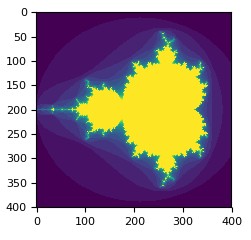
Mandelbrot set

线性代数

1
2
3
4
5
6
7
8
9
10
11
12
13
14
15
16
17
18
19
20
21
22
23
24
25
26
27
28
29
30
31
32
33
34
35
>>> import numpy as np
>>> a = np.array([[1.0, 2.0], [3.0, 4.0]])
>>> print(a)
[[ 1. 2.]
[ 3. 4.]]

>>> a.transpose()
array([[ 1., 3.],
[ 2., 4.]])

>>> np.linalg.inv(a)
array([[-2. , 1. ],
[ 1.5, -0.5]])

>>> u = np.eye(2) # 2x2 单位矩阵; "eye" 表示 "I",单位矩阵
>>> u
array([[ 1., 0.],
[ 0., 1.]])
>>> j = np.array([[0.0, -1.0], [1.0, 0.0]])

>>> j @ j # 矩阵
array([[-1., 0.],
[ 0., -1.]])

>>> np.trace(u) # 计算对角线元素的和
2.0

>>> y = np.array([[5.], [7.]])
>>> np.linalg.solve(a, y)
array([[-3.],
[ 4.]])

>>> np.linalg.eig(j)
(array([ 0.+1.j, 0.-1.j]), array([[ 0.70710678+0.j , 0.70710678-0.j ],
[ 0.00000000-0.70710678j, 0.00000000+0.70710678j]]))

小技巧

“自动”变型

1
2
3
4
5
6
7
8
9
10
11
12
13
14
15
>>> a = np.arange(30)
>>> a.shape = 2,-1,3 # -1 means "whatever is needed"
>>> a.shape
(2, 5, 3)
>>> a
array([[[ 0, 1, 2],
[ 3, 4, 5],
[ 6, 7, 8],
[ 9, 10, 11],
[12, 13, 14]],
[[15, 16, 17],
[18, 19, 20],
[21, 22, 23],
[24, 25, 26],
[27, 28, 29]]])

处理直方图

1
2
3
4
5
6
7
8
>>> import numpy as np
>>> import matplotlib.pyplot as plt
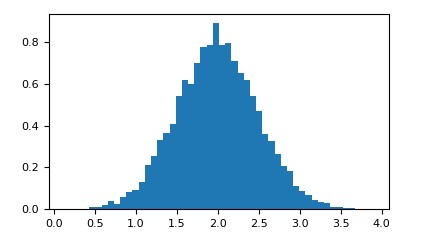
>>> # 方差 0.5^2, 均值 2
>>> mu, sigma = 2, 0.5
>>> v = np.random.normal(mu,sigma,10000)
>>> # 标准直方图
>>> plt.hist(v, bins=50, density=1)
>>> plt.show()

histogram

1
2
3
4
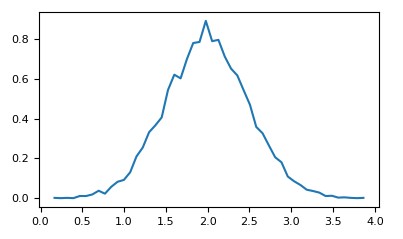
>>> # 使用numpy计算
>>> (n, bins) = np.histogram(v, bins=50, density=True)
>>> plt.plot(.5*(bins[1:]+bins[:-1]), n)
>>> plt.show()

histogram_numpy

使用Python OpenCV提取图片中的特定物体

发表于 2018-06-17

OpenCV

OpenCV是一个基于BSD许可(开源)发行的跨平台计算机视觉库,可以运行在Linux、Windows、Android和Mac OS操作系统上。它轻量级而且高效——由一系列C函数和少量C++类构成,同时提供了Python、Ruby、MATLAB等语言的接口,实现了图像处理和计算机视觉方面的很多通用算法。

HSV颜色模型

HSV(Hue, Saturation, Value)是根据颜色的直观特性由A. R. Smith在1978年创建的一种颜色空间, 也称六角锥体模型(Hexcone Model)。、这个模型中颜色的参数分别是:色调(H),饱和度(S),亮度(V)。

目前在计算机视觉领域存在着较多类型的颜色空间(color space)。HSV是其中一种最为常见的颜色模型,它重新影射了RGB模型,从而能够视觉上比RGB模型更具有视觉直观性。

一般对颜色空间的图像进行有效处理都是在HSV空间进行的,HSV的取值范围如下:

1
2
3
4
5
H:  0 ~ 180

S: 0 ~ 255

V: 0 ~ 255

目标

原图

这是我们的原图,我们希望把图片中间的绿色区域“扣”出来。

代码示例

源码地址image_cutter

1
2
3
4
5
6
7
8
9
10
11
12
13
14
15
16
17
18
19
20
21
22
23
24
25
26
27
28
29
30
31
32
33
34
35
36
37
38
39
40
41
42
43
44
45
46
47
48
49
50
51
52
53
54
55
56
57
58
59
60
61
62
63
64
65
66
67
68
69
70
71
72
73
74
75
76
77
78
79
80
81
82
83
84
85
86
87
88
89
90
91
92
93
94
95
96
97
98
99
100
101
102
#!/usr/bin/env python
import cv2
import numpy as np


def find_center_point(file, blue_green_red=[], target_range=(), DEBUG=False):
result = False
if not blue_green_red:
return result

# 偏移量
thresh = 30
hsv = cv2.cvtColor(np.uint8([[blue_green_red]]), cv2.COLOR_BGR2HSV)[0][0]
lower = np.array([hsv[0] - thresh, hsv[1] - thresh, hsv[2] - thresh])
upper = np.array([hsv[0] + thresh, hsv[1] + thresh, hsv[2] + thresh])

# 载入图片
img = cv2.imread(file)

# 获取图片HSV颜色空间
hsv = cv2.cvtColor(img, cv2.COLOR_BGR2HSV)

# 获取遮盖层
mask = cv2.inRange(hsv, lower, upper)

# 模糊处理
blurred = cv2.blur(mask, (9, 9))

# 二进制化
ret,binary = cv2.threshold(blurred, 127, 255, cv2.THRESH_BINARY)

# 填充大空隙
kernel = cv2.getStructuringElement(cv2.MORPH_RECT, (21, 7))
closed = cv2.morphologyEx(binary, cv2.MORPH_CLOSE, kernel)

# 填充小斑点
erode = cv2.erode(closed, None, iterations=4)
dilate = cv2.dilate(erode, None, iterations=4)

# 查找轮廓
_, contours, _ = cv2.findContours(
dilate.copy(), cv2.RETR_EXTERNAL, cv2.CHAIN_APPROX_SIMPLE)

i = 0
centers = []
for con in contours:
# 轮廓转换为矩形
rect = cv2.minAreaRect(con)
if not (target_range and
rect[1][0] >= target_range[0] - 5 and
rect[1][0] <= target_range[0] + 5 and
rect[1][1] >= target_range[1] - 5 and
rect[1][1] <= target_range[1] + 5):
continue
centers.append(rect)
if DEBUG:
# 矩形转换为box对象
box=np.int0(cv2.boxPoints(rect))

# 计算矩形的行列起始值
y_right = max([box][0][0][1], [box][0][1][1],
[box][0][2][1], [box][0][3][1])
y_left = min([box][0][0][1], [box][0][1][1],
[box][0][2][1], [box][0][3][1])
x_right = max([box][0][0][0], [box][0][1][0],
[box][0][2][0], [box][0][3][0])
x_left = min([box][0][0][0], [box][0][1][0],
[box][0][2][0], [box][0][3][0])

if y_right - y_left > 0 and x_right - x_left > 0:
i += 1
# 裁剪目标矩形区域
target = img[y_left:y_right, x_left:x_right]
target_file = 'target_{}'.format(str(i))
cv2.imwrite(target_file + '.png', target)
cv2.imshow(target_file, target)


print('rect: {}'.format(rect))
print('y: {},{}'.format(y_left, y_right))
print('x: {},{}'.format(x_left, x_right))

if DEBUG:
cv2.imshow('origin', img)
cv2.waitKey(0)
cv2.destroyAllWindows()
return centers

if __name__ == '__main__':
# 目标的 bgr 颜色值,请注意顺序
# 左边的绿色盒子
bgr = [40, 158, 31]

# 右边的绿色盒子
# bgr = [40, 158, 31]

point = find_center_point('opencv-sample-box.png',
blue_green_red=bgr,
DEBUG=True)
# 中心坐标
# point: [((152.0, 152.0), (63.99999237060547, 61.99999237060547), -0.0)]
print(point[0][0][0])

运行之后我们得到了我们的目标图区域:

目标图

一般来说,我们会选择一些比较纯净的颜色区块,从而比较容易控制噪点,提高准确率。

AnyProxy的自定义规则

发表于 2018-06-11

概述

AnyProxy是一个开放式的HTTP代理服务器。

主要特性包括:

  • 基于Node.js,开放二次开发能力,允许自定义请求处理逻辑
  • 支持Https的解析
  • 提供GUI界面,用以观察请求

类似的软件还有Fiddler,Charles等。对于二次开发能力的支持,Fiddler 提供脚本自定义功能(Fiddler Script)。

Fiddler Script的本质其实是用JScript.NET语言写的一个脚本文件CustomRules.js,语法类似于C#,通过修改CustomRules.js可以很容易的修改http的请求和应答,不用中断程序,还可以针对不同的URI做特殊的处理。

但是如果想要进行更加深入的定制则有些捉襟见肘了,例如发起调用远程API接口等。当然如果你是C#使用者,这当然不在话下了。

我们都知道Node.js几乎可以做差不多任何事:),而基于Node.js的AnyProxy则给予了二次定制更大的空间。

安装

因为是基于Node.js,故而Node支持的平台AnyProxy都能支持了。

npm install -g anyproxy

对于Debian或者Ubuntu系统,在安装AnyProxy之前,可能还需要安装 nodejs-legacy。

sudo apt-get install nodejs-legacy

启动

  • 命令行启动AnyProxy,默认端口号8001

anyproxy

  • 启动后将终端http代理服务器配置为127.0.0.1:8001即可

  • 访问http://127.0.0.1:8002 ,web界面上能看到所有的请求信息

rule模块

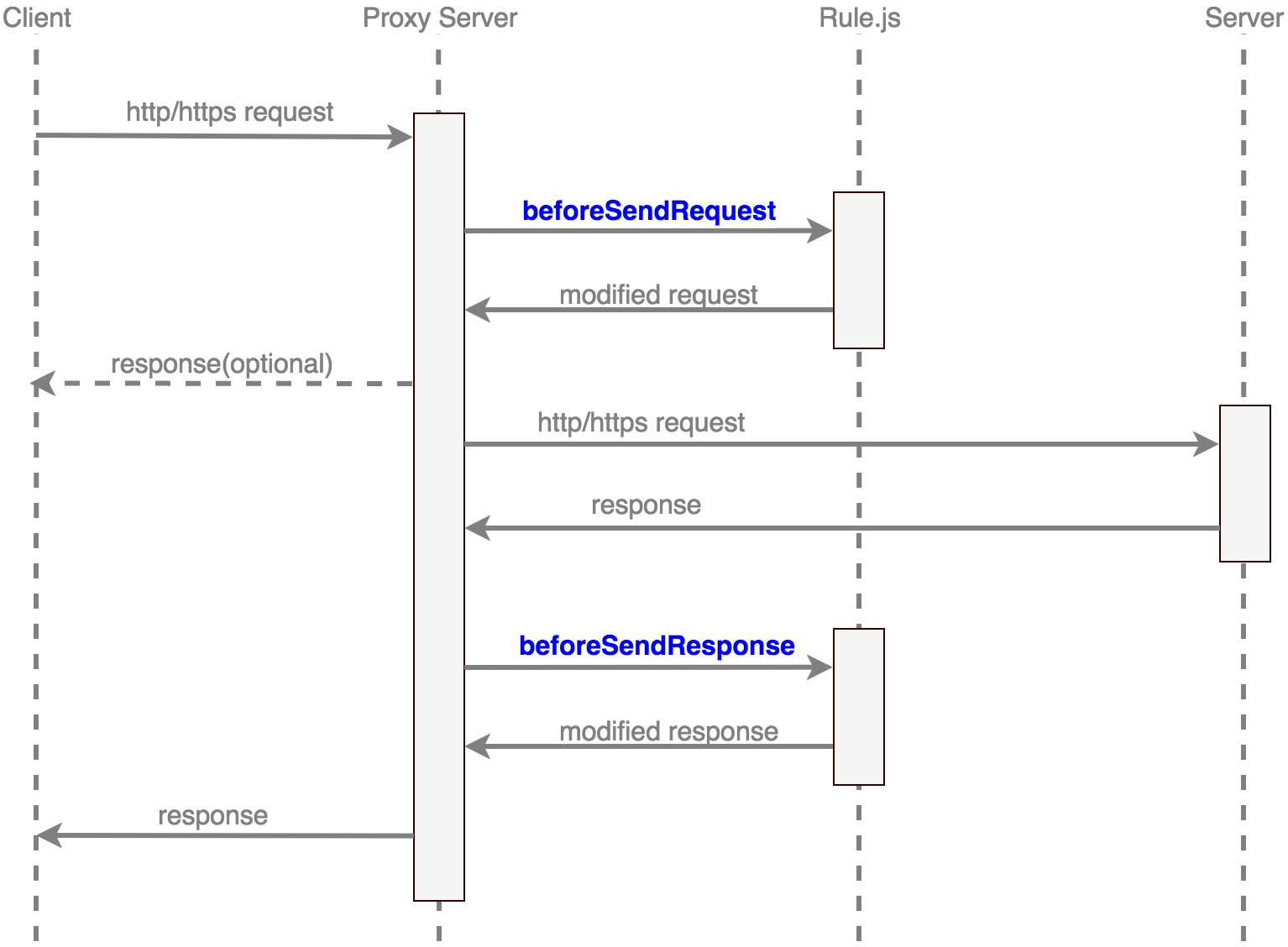
AnyProxy提供了二次开发的能力,你可以用js编写自己的规则模块(rule),来自定义网络请求的处理逻辑。

处理流程

例如我们想针对某些域名做检测,看经过AnyProxy代理的请求中是否包含了我们想要检测的那些域名。那么我们可以通过以下脚本实现:

  • 首先我们安装两个包

    npm install redis
    npm install request

  • 然后编写文件check.js

1
2
3
4
5
6
7
8
9
10
11
12
13
14
15
16
17
18
19
20
21
22
23
24
25
26
27
28
29
30
31
32
33
34
35
36
37
38
39
40
41
42
43
44
45
46
47
48
49
50
51
52
53
54
55
56
57
58
59
60
61
62
63
64
// file: check.js
var redis = require('redis')
var request = require('request')

var redisOn = true

var client = redis.createClient('6379', '127.0.0.1')

client.on("error", function(error) {
console.log(error);
var redisOn = false
})

var domainsListToCheck = [
'domainToCheck1',
'domainToCheck2',
'domainToCheck3',
'domainToCheck4',
'domainToCheck5',
]

module.exports = {
*beforeSendResponse(requestDetail, responseDetail) {

var inList = false

for (var i = 0; i < domainsListToCheck.length; i++) {

inList = requestDetail.url.search(domainsListToCheck[i]) != -1
if(inList){
break
}
}

if (inList) {

var ua = requestDetail.requestOptions.headers['User-Agent'].toLowerCase()
var ourAgent = ''

if(ua.search('iphone') != -1){
ourAgent = 'iphone'
}

if(ourAgent){

if(redisOn){
client.select('0', function(error){
client.set(ourAgent, '1', function(error, res) {
console.log(error, res)
})
})
}else{
request({
url: 'https://keyvalue.immanuel.co/api/KeyVal/UpdateValue/lglm4ov9/'+ourAgent+'/1',
method: "POST",
}, function(error, response, body) {
console.log(error, response, body)
});
}
}
return null
}
},
}

值得注意的是,我们在脚本中还是使用了一个本地Redis服务,如果你不想在本地启动一个Redis实例,你也可以使用keyvalue.immanuel.co。

keyvalue.immanuel.co是一个在线的Key-Value存储服务,完全免费。对于这种临时的,不重要的标记真是再方便不过了。个人使用下来觉得很赞。

使用自定义rule模块

anyproxy --rule check.js

了解更多

AnyProxy的更多功能可以参考官方文档。

123<i class="fa fa-angle-right"></i>

28 日志
55 标签
© 2026 oobspark
由 Hexo 强力驱动
主题 - NexT.Muse